

Usage and reports
Limitry counts every check per limit, per subject, per hour. Reports in the app and the API are at most about a minute behind. Test and live each have their own usage: the app shows the side you picked, and the API answers for the key’s environment.
In the app
Section titled “In the app”The Usage page shows, for the limit you pick:
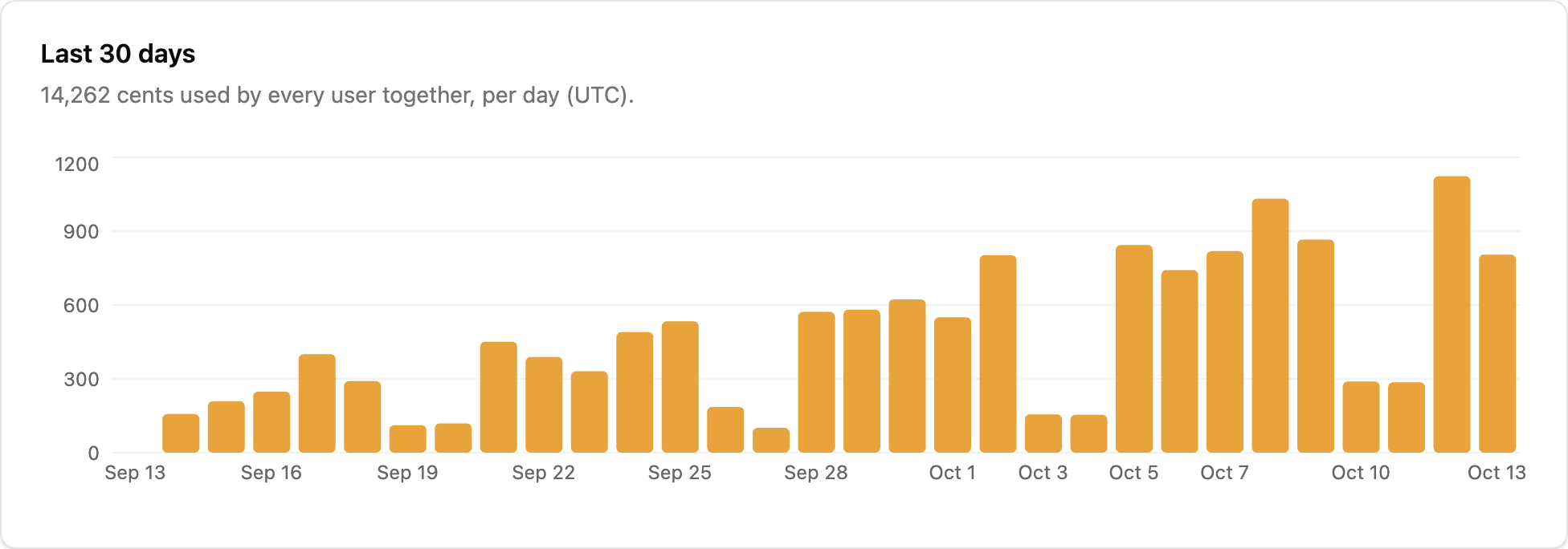
- Last 30 days: units used per day (UTC), across all subjects. A plan that keeps less history shows fewer days: Free keeps 7.
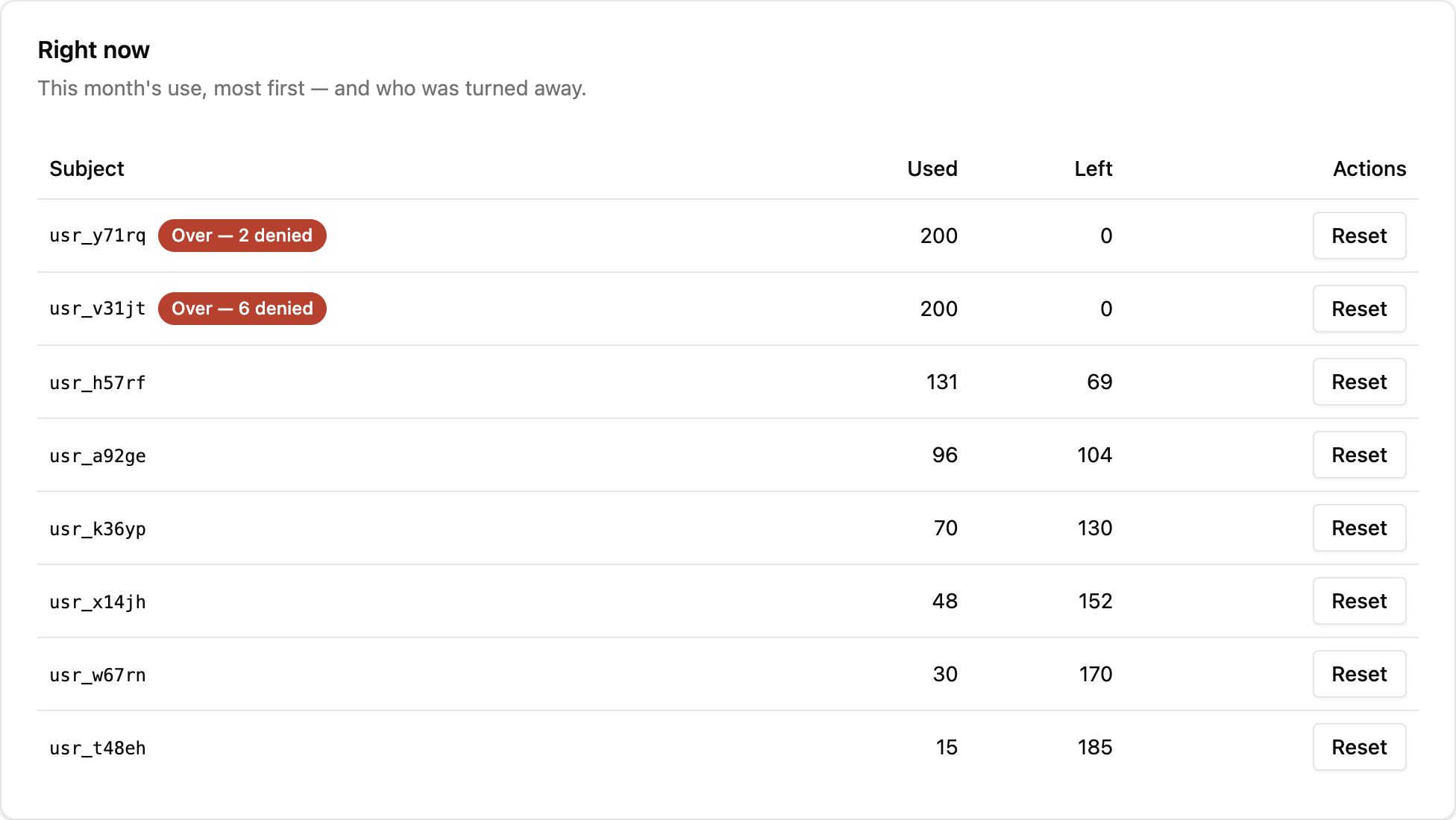
- Right now: the subjects using the limit, most used first, with what each has used and has left in its current period. For a limit that resets on each subject’s billing date or from first use, that’s each subject’s own period. A subject that was refused shows how many of its checks were refused. Owners and admins can Reset a subject, which resets it at once (see When limits reset).
Busiest subjects, at the bottom of the page, lists the five subjects that made the most checks a second in the last 7 days, with when. The figure is a minute’s checks divided by 60, for the subject’s busiest minute. Limitry handles up to about 100 checks a second on one subject. A subject making 60 or more a second gets a note that it’s busy: Limitry is handling it, and there’s nothing for you to do.
From your code or the CLI
Section titled “From your code or the CLI”A limit’s use over time, by day (the default) or by hour, and who is
using it in the current window. A key or token needs limits:read:
import { createClient } from "@limitry/sdk";
const limitry = createClient();
const history = await limitry.usage.query({  limitId: "lmt_3f0c…",  granularity: "day",});const now = await limitry.usage.subjects({ limitId: "lmt_3f0c…" });
from limitry import Limitry
limitry = Limitry()
history = limitry.usage.query(limit_id="lmt_3f0c…", granularity="day")now = limitry.usage.subjects(limit_id="lmt_3f0c…")limitry usage query --limit-id lmt_3f0c… --granularity daylimitry usage subjects --limit-id lmt_3f0c…curl "https://api.limitry.com/v1/usage?limitId=$LIMIT_ID&granularity=day" \ -H "Authorization: Bearer $LIMITRY_API_KEY"curl "https://api.limitry.com/v1/usage/subjects?limitId=$LIMIT_ID" \ -H "Authorization: Bearer $LIMITRY_API_KEY"The history has every bucket in the range, zeros included, each with
used, allowed and refused. Add subject (as kind:id, such as
user:usr_123) for one subject, and from and to (ISO times) for a different range. The
default range is the last 30 days, and no range reaches further back
than your plan’s history (Free keeps 7 days; see
Plan allowances). used is net: Limitry gives back the unused part of a reservation, and all of a released one.
For a balance (window total), what’s left includes the credits you’ve
added.
Limitry keeps usage for 13 months on every plan. Your plan sets how far back you can look: 7 days on Free, 90 days on Pro, 13 months on Growth. After an upgrade, the older usage is there to see.
To read a whole billing period after it ends, use Pro or Growth. On Free, send each finished hour to your billing system as it ends, as Use Limitry with Stripe does.
Webhook: limit.reached
Section titled “Webhook: limit.reached”The first time a limit refuses a subject in a window, your webhook
endpoints receive limit.reached. Here a user has spent this month’s
AI budget:
{ "type": "limit.reached", "data": { "limitId": "lmt_…", "name": "AI budget", "action": "ai-call", "unit": "cents", "window": "month", "subject": { "kind": "user", "id": "usr_123" }, "environment": "live", "windowStart": "2026-10-01T00:00:00.000Z", "resetsAt": "2026-11-01T00:00:00.000Z" }}It’s sent once per subject, limit and window, not on every refused check.
environment says whether it happened in test or live, and only
that environment’s endpoints receive it. resetsAt is null for a balance. Add an endpoint under
Settings → Webhooks.
To hear before a subject is refused, use limit.threshold_crossed,
sent at 80% and 100% of a limit. See
Warnings before a limit.
One subject, right now
Section titled “One subject, right now”limitry.standing(...) in the SDKs (limitry usage standing on the
CLI) answers where one subject stands on every limit
that applies to it, exactly as a check would see it. It’s what you call
to show your own users how much they have left. See
Show users where they stand.