

Limits
A limit says how much a subject may use per window. It reads as one sentence: each user may use 200 cents per month. Subjects are whoever acts in your product, such as your users, teams, API keys or AI agents. You choose the labels, and Limitry only matches them.
The three kinds
Section titled “The three kinds”| Kind | Reads as | window |
|---|---|---|
| Per period | each user may use 100 credits per month | minute, hour, day, week, month or year |
| Balance | each user starts with 500 credits; add more | total, a balance that never resets |
| Running at once | each user may run 3 at the same time | concurrent: a slot per running job (a reservation), given back when it finishes |
In the app, New limit on the Limits page asks for the kind, then the sentence: Each [user] may use [100] [credits] per [month]. Everything else is under More options, with the defaults below, and a preview reads back what a subject would see. After you save, Add another limit opens a new one with the same unit and period filled in.
Fields
Section titled “Fields”Only subject.kind, amount and window are required.
| Field | Meaning |
|---|---|
subject |
Who it applies to. {"kind": "user"} is every user; add "id": "usr_123" for one subject. |
amount |
How many units per window. For concurrent, how many at once. |
window |
minute, hour, day, week, month, year, total or concurrent. See below. |
action |
The action it limits. Default *, every action. |
unit |
What the amount counts (calls, credits, cents), in words. Default units. |
name |
Your label, unique among the environment’s active limits. Default: the sentence, such as “100 credits per user per month”. |
every |
How many windows a period lasts: every: 3 with month is a quarter. Default 1. |
start |
Where a period begins: calendar (the default), billing_date or first_use. See When limits reset. |
rolling |
With minute, hour or day: count the last 60 seconds, minutes or 24 hours. Default false. |
failMode |
What your code should do when Limitry can’t be reached: open (allow, the default) or closed (deny). |
enabled |
Whether checks enforce it. Default true. |
A name made from the sentence names the action when it isn’t *:
“100 credits per user per month for ai-call”. If another active limit
already has that name, the API answers 409 with invalid_request and
creates nothing. Send a name of its own.
Limitry saves every count before a check answers, whatever the limit. There is no faster mode that could lose a count.
Windows
Section titled “Windows”minute,hour,day,week,monthandyearreset at the end of each period: on UTC boundaries by default, on each subject’s billing date, or a set time after its first use. A period can be several windows long: every 3 months, every 5 hours. See When limits reset.minute,houranddaycan also be rolling: they count the last 60 seconds, minutes or 24 hours.totalis a balance that never resets, for prepaid credits. See Pools, balances and budgets.concurrentallows at mostamountat once. See Rolling windows and concurrency.
When several limits match a subject and action, all of them apply,
with one exception. That’s how you give each of your users a monthly AI
budget and a cap of 100 AI replies a day: two limits, and a check has to fit
both. A limit for one subject (with subject.id set)
replaces the limits for its whole kind that have the same action and
window. The exception is how you give one customer more than their kind allows,
or less. The kind’s other limits still apply: a subject with its own
minute limit is still held to the kind’s day limit.
To limit a user, their team and their tenant at once, make one limit for each and name all three in the check. See Budgets at several levels.
Creating a limit
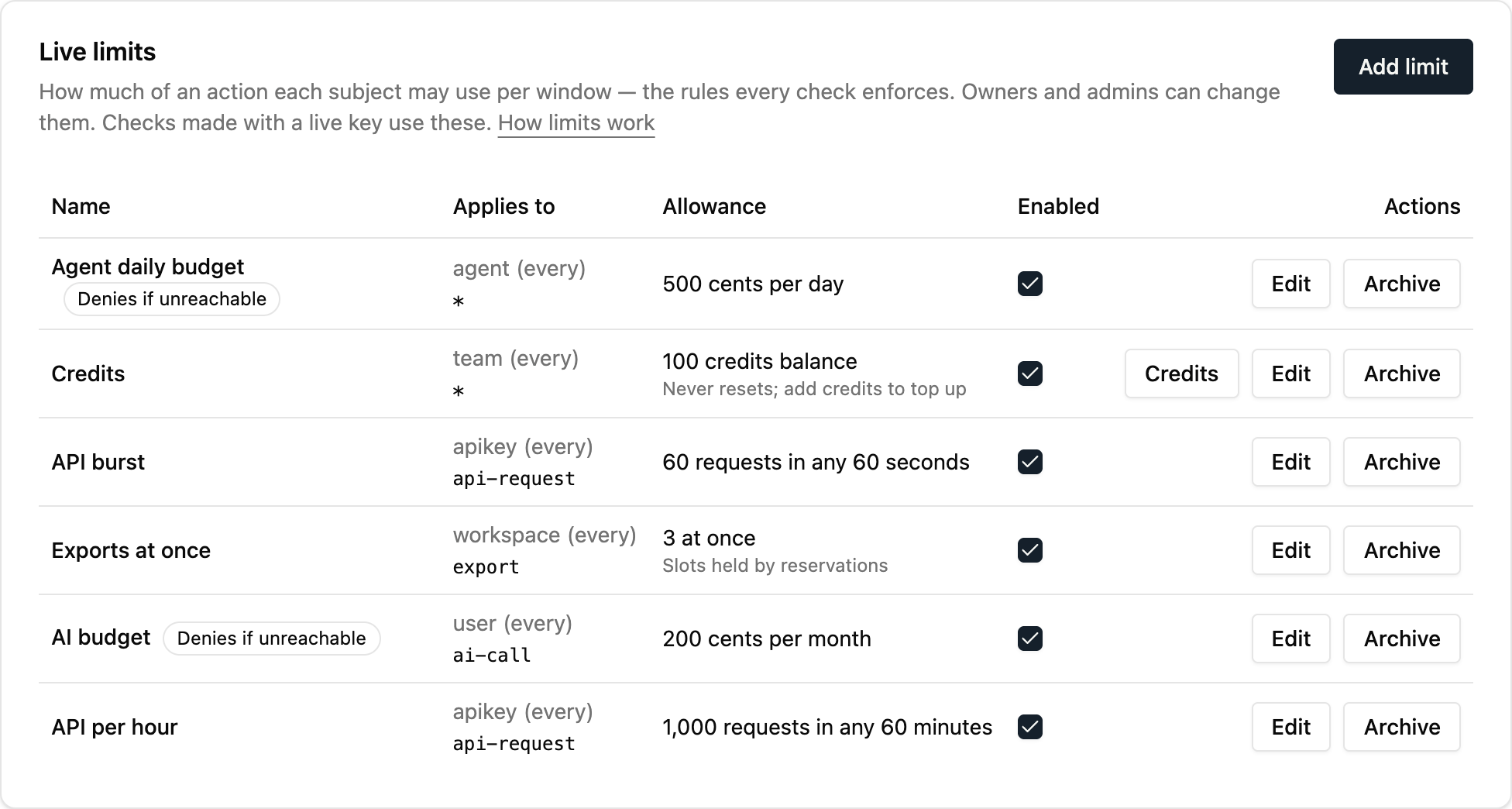
Section titled “Creating a limit”In the app, limits are on the Limits page. Owners and admins
can change them, and every member can see them. From your code or the
CLI, a key or token needs the limits:read or limits:write scope:
import { createClient } from "@limitry/sdk";
const limitry = createClient();
// Named "200 cents per user per month for ai-call"await limitry.limits.create({  subject: { kind: "user" },  action: "ai-call",  amount: 200,  unit: "cents",  window: "month",  failMode: "closed",});
from limitry import Limitry
limitry = Limitry()
# Named "200 cents per user per month for ai-call"limitry.limits.create( subject={"kind": "user"}, action="ai-call", amount=200, unit="cents", window="month", fail_mode="closed",)limitry limits create --subject '{"kind":"user"}' --action ai-call \ --amount 200 --unit cents --window month --fail-mode closedcurl -X POST https://api.limitry.com/v1/limits \ -H "Authorization: Bearer $LIMITRY_API_KEY" \ -H "Content-Type: application/json" \ -d '{"subject":{"kind":"user"},"action":"ai-call","amount":200, "unit":"cents","window":"month","failMode":"closed"}'Agents can do the same through the MCP server. The workspace’s audit log records every change, and a change reaches checks at once.
What can change
Section titled “What can change”You can change a limit’s name, amount and fail mode at any time, and
turn it off or on. What it counts is fixed once it exists: subject
(kind and id), action, unit, window, every, start and
rolling. Changing one of those would start the limit’s counts over,
or compare counts in the wrong unit, so Limitry refuses it with 400
invalid_request and a message saying what to do.
To change what a limit counts, create a new limit with the new values,
then archive the old one. Its history stays. In the app, the edit view
shows the fixed fields as text, with “Create a new limit to change
this”. In a limitry.json, give the entry a new
name.
A limit that’s off (enabled: false) never refuses, but checks still
count against it: turn it on again and it starts from what was really
used, not from zero.
A limit no check reaches
Section titled “A limit no check reaches”Each limit says when a check last reached it (lastCheckedAt, to the
hour, from usage history). The Limits page flags a limit that no
check has reached in 7 days: “No check has named a team in 7 days: this
limit isn’t being enforced”. It usually means your checks send a
different subject kind or action than the limit has, such as teams
for team. Fix the check, or create a limit that matches it.
Managing limits
Section titled “Managing limits”Test and live each have their own limits. The app shows the side you picked at the top right, and a key manages the limits of its own environment. Set limits up in test, then click Copy to live to create or update them in live. See Test and live.
To keep your limits in your repository instead, list them in a
limitry.json and run limitry sync. It
creates, changes and (if you ask) archives limits by name to match the
file, from your machine or from CI. See
Sync limits from GitHub.
Trying a limit in the app
Section titled “Trying a limit in the app”In test, the Limits page has Try a check. Pick a limit, type
a subject id such as usr_123, and click Check. You get the same
answer your code would get from a check with a test key: allowed or
refused, and what’s left on every limit that applies. Click it until a
limit refuses to see a refusal. These checks count against your test
allowance and aren’t billed. Owners and admins can try checks; it isn’t
on the live side, where a check would count for real.
Examples to start from
Section titled “Examples to start from”While a workspace has no limits in test, the Limits page offers Add example limits: images per user per day, an AI budget per user per month, and API calls per key per minute, each named “Example: …”. Simulate traffic then sends a few hundred test checks from pretend users and keys, enough that some are refused, and the Usage page shows them within a minute. Test checks aren’t billed. Remove examples archives the example limits and nothing else. Examples are for test only.
Archiving a limit
Section titled “Archiving a limit”Limitry never erases a limit. When you no longer need one, archive it:
Archive on the Limits page, or limitry limits archive <limit-id>.
Checks stop enforcing it at once and don’t count against it while it
is archived. It leaves the list, but its usage history and credits
stay. The Usage page still shows it, marked archived.
Archived limits on the Limits page lists them, and Restore (or
limitry limits restore <limit-id>) brings one back. An archived
limit’s name is free, so a new limit can take it. You can’t restore a
limit while another active limit has its name.